A hyperconverged minilab cluster with Ceph and K3s - part 2 - hardware
Ceph
As is pretty common in homelabs, I really like USFFs (Ultra Small Form Factor PCs); not only are they space-efficient, they’re power-efficient too. I once swapped my 2008 quad-core Xeon machine for a 2014 HP 260 G1 with a dual-core i3 and didn’t lose any funcionality, while the power savings paid for the machine in 12 months. I still own that HP, as well as 4 others. In the same category are Dell Optiplex Micros and Lenovo ThinkCenter Tiny. Most of them have the same internal layout - a 2.5” SATA bay, a wifi card slot and 2 SO-DIMM slots.
4 of these HPs were originally my hypervisors. As my homelab evolved, I expanded from a single server running VMs under KVM/QEMU, into a semi-cluster of 3 (there was some VM migration possible but it was clunky), into a full cluster of Proxmox Virtual Environment machines, into a cluster of 4. At its peak, each node had a 512GB SSD for local VM storage, with my NAS running on an ARM board. Then I built a more powerful NAS to run ZFS and explore TrueNAS, and from there I started using iSCSI as the backend (also trying out a Drobo, which proved the shared-storage concept). Then I added 2.5Gb USB NICs to them. Then I upgraded to a set of much, much newer NUCs, because the HPs are maxed out with 16GB of DDR3 and even with 64GB aross the cluster, that means I can’t spin up large VMs easily. My current hypervisors are 6-core Ryzen 5s with 64GB DDR4 and onboard 2.5Gb.
So that’s 4 identical HPs with 2.5Gb NICs. I had machinations of using them as Ceph nodes as soon as I replaced them. I’ve successfully built and rebuilt it a few times - twice with 512GB SSDs cos I messed up the first, and now all 4 nodes have a 1TB SATA SSD. Better, I managed to fit 256GB NVMe SSDs to the wifi card slot (using mini-PCIe to m.2 adapters), and to my surprise these old HPs will boot from them no problem. So the whole 1TB can be allocated to Ceph.
But these machines are over 10 years old, I hear you say? Why would I keep using them? Well, the short answer is - they’re good enough. I measured them at idle and they pull 6-8W. The Core i3 has enough power to run what I ask of them, so there really isn’t any point in getting anything newer - the power savings just wouldn’t be significant enough. 2 cores and 16GB is plenty to run a Ceph node - they use between 3 and 4GB with the cluster idling, depending on which machine is running the dashboard, and minimal load of 0.15.
So each node comes to:
- Intel Core i3 4030U 1.9GHz 2C/4T
- 16GB DDR3 dual-channel (either 1333 or 1600)
- 256GB NVMe boot SSD
- 1TB SATA SSD
- Realtek RTL8125 USB3.0 2.5Gb NIC
- 4x USB3.0, 2x USB2.0
- Debian 12 Bookworm
At present, Ceph version 20 (‘Tentacle’) does not have a release for Debian version 13 (‘Trixie’) so I’ve had to hold off updating it - I managed to confirm that, no, the Bookworm packages will not work on Trixie as the Python versions are significantly different (srsly Python, every day you become more of what you swore to destroy…). So until such time as Ceph updates for Trixie, I’m stuck on Bookworm.
K3s
So I previously mentioned the Dell Wyse 3040. It’s a neat little lesson in economy - it’s literally enough hardware to do a single job. Equally, it can be easily repurposed. Wyse terminals used to be dedicated hardware/software solutions that were only usable as terminals. A clear indicator of the industry trend towards commodity hardware replacing these traditional niches, the Wyse 3040 (NB. don’t mix these up with the Optiplex 3040, that’s a different machine entirely) is in fact a full x86-64 PC with UEFI-64 firmware. There’s even a wifi card slot if you’re particularly daring to expand the meagre hardware:
- Intel Atom x5-Z8350 1.44GHz 4C/4T
- 2GB DDR3-1600
- 8GB eMMC
- Realtek RTL8111 gigabit NIC
- Dual DisplayPort
- 1x USB3.0, 3x USB2.0
- Debian 13 Trixie
No such restrictions on Trixie here. These machines are cheap and plentiful on eBay; some sellers list them 100 at a time!
Earlier, I mentioned that these little devices can be run off USB. That’s selling them short, as there’s an even better way to power them - Power over Ethernet (PoE). If you buy one of these secondhand, chances are they won’t include a power adapter - several of mine didn’t - so this may work in your favour. The power input is a barrel jack, and it’s identical to a Sony PSP, so if you can get a USB-PSP adapter, you’re good. That said, the 3040s have a tendancy to be really picky about stable voltages - your power supply must output a steady 5.0V, no lower, or these devices will not turn on. RPi’s are often more tolerant of bad voltages (they whine about it though). A couple of my PoE adapters have turned out to be not close enough that I’ll have to replace them; those 2 nodes are currently running from power adapters. The other 4 are running from the PoE adapters, though one of them is only negotiating 100Mbps, so that’s probably angling for replacement too.
Network
No point in having this cluster if nothing can talk to each other.
I’ve assigned a dedicated VLAN (17) and /24 network to this cluster:
- 192.168.17.1 - gateway
- 192.168.17.2 - K3s node ‘Broon’
- 192.168.17.3 - K3s node ‘Dirk’
- 192.168.17.4 - K3s node ‘Hentor’
- 192.168.17.5 - K3s node ‘Lerxst’
- 192.168.17.6 - K3s node ‘Pratt’
- 192.168.17.7 - K3s node ‘Booujzhe’
- 192.168.17.8 - Ceph node 1
- 192.168.17.9 - Ceph node 2
- 192.168.17.10 - Ceph node 3
- 192.168.17.11 - Ceph node 4
Yeah, my creativity ran out towards the end there, didn’t it? ‘Booujzhe’ was added later to bring the cluster to an even number which is why they’re not in alphabetical order.
As nice as it would have been to have all these machines (indeed, my entire lab) on the same switch, big 2.5Gb switches are still crazy expensive, and that’s before you try to get PoE versions. I do have a spare Netgear PoE gigabit switch which would have been adequate for the K3s nodes, but the idea of running iSCSI as vital storage means they could conceivably exceed a single 1Gb uplink - heck, I have 6 nodes and only 8 ports on the switch, they could exceed 2 uplinks even if I LAG’d them.
Needing PoE elsewhere in my lab, I recently bought a D-Link DGS-1510-28P switch. Whilst I can’t vouch for the UI, it’s capable - it’s a layer-3 switch with 24 PoE gigabit ports and - bonus - 2x SFP+ slots. Having occasionally exceeded 1Gbps uplink from my primary gigabit switch, I’d been in need of a switch with a faster uplink so this was exactly the right hardware. One downside of PoE switches is that they tend to be fan-cooled; make sure you get one with smart fan speed control. As the weather heats up here in the UK, the fans have been getting kinda noticeable.
So I have 6 ports of this switch set to VLAN 17 and PoE on. Then I have one of the SFP+ ports set to VLAN 17 as well.
The Ceph nodes have their own switch - a cheap Sodola 2.5Gb web-managed switch with 2x SFP+ uplinks. The purpose here is to aggregate the Ceph bandwidth to 10Gb, then the D-Link switch can split that out to the K3s nodes as necessary. The Sodola switch is pretty terrible - the UI is simplistic and honestly has no advantage being managed with my setup, there isn’t even SNMP monitoring.
Rack
Earlier this year, I got a 3D printer from a friend who’d upgraded. And one of the things that had caught my attention on Reddit was the proliferation of 3D-printed 10” racks. They looked really neat. Racks make things clean and tidy (ish). Some of them had really nice finishes too. So I decided I was going to build one of my own; for the cost of PETG filament, it was pretty cheap too.
I looked through all the designs available on Printables.com, MakerWorld and Thingiverse. The LabRax is popular and a very sturdy design, but has one disadvantage - it needs additional aluminium supports. Certainly good if you’re building a large rack, but what can you get away with in pure PETG? Especially if you have a relatively small 225x225mm bed?
Simply put, this: https://www.printables.com/model/1622821-modular-10-inch-server-rack
It does need some M3 fixings to fully assemble but other than that, it looked like exactly what I wanted. Even when full (4 Ceph nodes, 6 K3s nodes, NICs, PoE adapters and the switch), the handles are solid and haven’t fallen apart yet.
The result is something that looks like this:
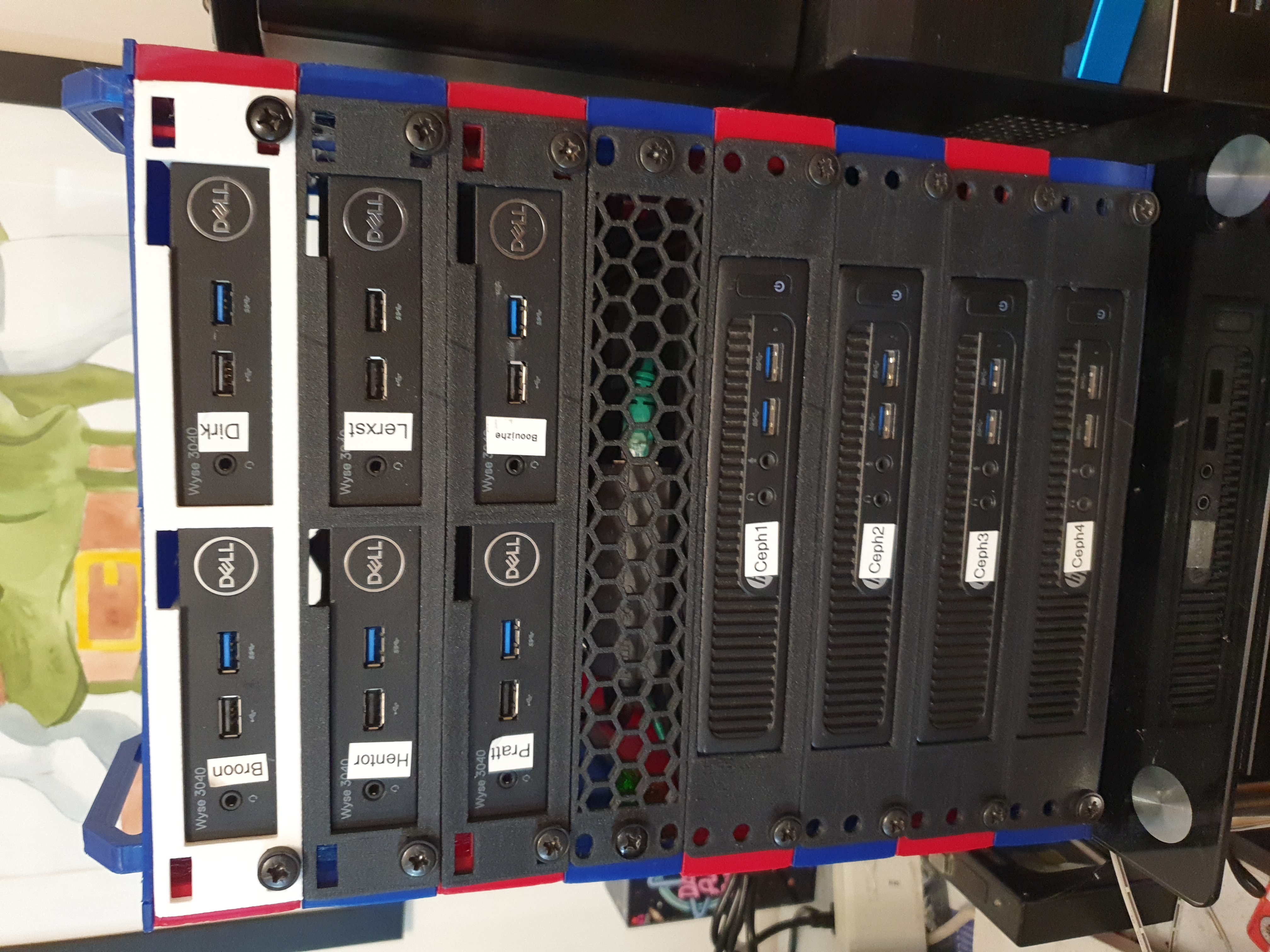 Not bad, huh? Even from the back it’s pretty neat:
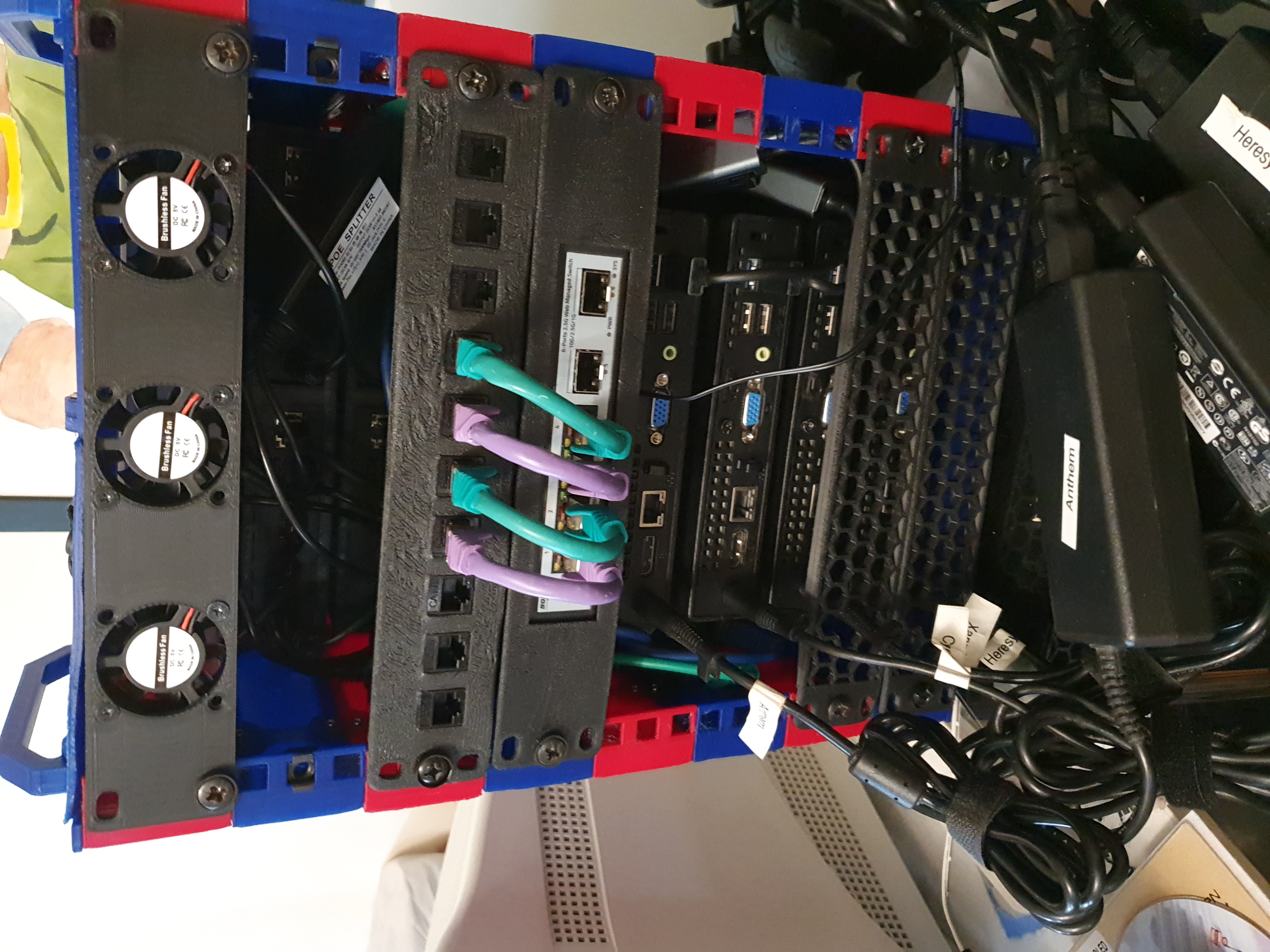 All the rack furniture is 3D-printed. The 3 fans are USB-powered from different K3s nodes - as the K3s nodes are passive-cooled and quite dense, they do need some airflow. The PoE adapters attach to keystones on a 10-way panel, which keeps the cabling to the PoE switch neat. Then there’s the 2.5Gb switch with a 10Gb DAC back to the PoE switch.
Power for the rest of the devices is pretty terrible - the 4 Ceph nodes have individual power bricks and the switch has a further one. However, this is probably as good as I’m gonna get it.
The blanking/vented plates are not for airflow, they’re to add extra strength to the 3D-printed rack.
So, now I have a result, how did I get to this point? See Part 3 for the technical stuff.